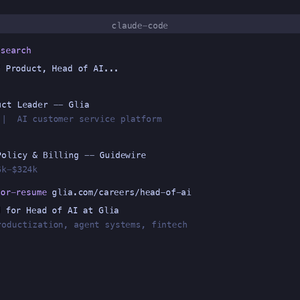
Something shifted in 2026. AI tools stopped being fancy autocomplete and started being able to actually do things in your browser. Claude Code and Cowork, ChatGPT’s Codex agent — these are browser-based AI agents that can open tabs, navigate job boards, read postings, fill out application forms, and click submit. They’re not chatbots. They take actions.
Meanwhile, the chat-based tools (Claude.ai, ChatGPT, Gemini) got better at the text side of job searching: tailoring resumes, writing cover letters, prepping for interviews. They can’t control a browser, but they can generate the materials you need if you give them the right context.
This post compares both categories honestly — what each one does well, where they struggle, and whether any of them can actually run a job search end to end.
These tools can control your browser. They navigate websites, click buttons, fill forms, and take multi-step actions on your behalf.
Claude Code runs from the terminal and can interact with your browser through extensions. Cowork is Anthropic’s browser-native agent — it works directly in Chrome, watching what you’re doing and taking actions when you ask. Together, they give you the most complete agent setup for job searching.
What they can do:
The edge: Claude’s context window is significantly larger than the competition. You can load your full work history document, the job description, your current resume, and detailed instructions in a single conversation. That context makes the output much more specific. The multi-step chaining is also the strongest here — you can set up a workflow that moves from finding a job to submitting a tailored application without restarting.
If you’ve read our guide on how to use Claude for your job search, this is the setup it describes.
OpenAI’s agent that can browse and take actions. Works similarly to Claude Code — it can navigate job boards, read postings, and fill out forms. Codex runs as a background agent that you give tasks to and it works on them asynchronously.
What it can do:
The trade-off: smaller context window than Claude, so you may need to break longer workflows into steps. Multi-step chaining is improving but less reliable — you’re more likely to need to intervene manually between steps. But for individual tasks, the output quality is comparable.
Both hit the same wall: complex application forms. Workday, Taleo, and custom ATS platforms have multi-page forms with conditional logic, dynamically loading dropdowns, and custom questions. Any AI agent will hit errors here. Simple one-page forms work well. Enterprise ATS platforms are a coin flip.
They also struggle with judgment. An agent can match keywords from a JD to your resume, but it can’t decide whether to lead with your management experience or your technical skills for this particular role. That requires understanding the hiring manager’s priorities and the competitive landscape — something no AI agent handles well yet.
These can’t control a browser, but they’re powerful for the text generation side of job searching. You paste in a job description and your resume, and they generate tailored materials.
For core job search text work, these are all strong and broadly comparable:
Resume tailoring. Give any of them a detailed work history and a JD, and you’ll get a good tailored resume. The quality depends more on what you feed them than which model you use. Claude.ai has the edge on long documents because of the context window. ChatGPT and Gemini are fine for single-role tailoring.
Cover letter writing. Same story. The differentiator is how much context you provide, not which tool you pick.
Interview prep. All three can predict likely questions from a JD and help you build STAR answers from your experience.
Job description analysis. Reading a JD and extracting requirements, preferred skills, and culture signals is straightforward LLM work. They all handle it well.
The practical difference: Claude.ai handles the longest documents without hitting limits, ChatGPT has the largest user base (so more community prompts and workflows), and Gemini is free through Google Workspace. For most job search tasks, pick whichever you have access to and use our free prompts — they work with any of them.
| Capability | Claude (Code + Cowork) | ChatGPT Codex | Chat tools (Claude.ai, ChatGPT, Gemini) |
|---|---|---|---|
| Resume tailoring quality | Strong | Strong | Strong |
| Cover letter quality | Strong | Strong | Strong |
| Browse and search job boards | Yes | Yes | No |
| Fill out application forms | Simple: yes. Complex: unreliable | Simple: yes. Complex: unreliable | No |
| Multi-step workflows | Best | Improving | Manual (copy-paste between steps) |
| Context window | Largest | Medium | Varies (Claude.ai largest) |
| Cost | Usage-based | Subscription | Free tiers available |
Here’s the part nobody talks about. Even when these tools work perfectly, they’re solving the wrong problem for most job seekers.
The bottleneck isn’t writing the resume. It’s knowing which version of your story to tell for which job. An AI can match your resume to a JD’s keywords, but it can’t decide how to position you against other candidates. That requires judgment about the hiring manager’s real priorities, the company’s culture, and what makes you genuinely different.
The bottleneck isn’t filling out forms. It’s maintaining quality across dozens of applications over months. AI agents work great for your first five applications. By application 30, you’ve stopped reviewing the output carefully, the agent is applying to roles that aren’t a good fit, and you’re back to spray-and-pray with a fancier tool.
The bottleneck isn’t speed. It’s strategy. Applying to 50 jobs a week doesn’t help if they’re the wrong 50 jobs. The most effective job searches we see at Proficiently combine targeted applications (15-25 per week, each properly tailored) with networking, interview prep, and relationship building. No AI tool handles that full picture on its own.
If you want to use AI tools for your job search yourself, here’s a realistic setup:
This approach works. It’s how a lot of people use our free prompts. But it requires discipline — you need to tailor each application, review the output, and sustain the effort across weeks or months.
The alternative is a managed service. At Proficiently, we start with a deep work history interview, then for every job you approve, we write a brand new resume and cover letter from scratch. Not a keyword swap — a full rewrite built for that specific role. We also identify hiring managers and draft outreach messages. You review and send everything, but we do the production work.
The difference isn’t that we have better AI than what you can access yourself. It’s that we combine AI with human judgment, do it consistently across every application, and free up your time for networking, interview prep, and showing up as a real person.
For a deeper look at setting up your own AI-powered search, our guide on using Claude for job searching has the full step-by-step. Our broader guide to the AI-powered job search covers the strategy behind when to automate and when to stay manual.
Yes, through Codex and Operator. It can browse job boards, read postings, and fill out application forms. It works well for simple applications but struggles with complex multi-step forms on Workday and similar platforms. You still need to review the output — AI agents make mistakes on form fields, especially custom questions.
For generating resumes and cover letters, they’re comparable. Claude (Code + Cowork) has a larger context window and stronger multi-step workflow chaining, which matters when you’re running a full search-to-apply pipeline. For individual tasks like “rewrite this bullet point,” either works fine.
Not yet. AI handles the text production well — resumes, cover letters, prep materials. It’s bad at judgment calls — which roles to target, how to position your story for a specific employer, when to network instead of apply. A service like Proficiently combines both: AI for speed, human expertise for strategy and quality.
For chat-based work (tailoring, cover letters, interview prep), Claude.ai’s free tier or Gemini through Google Workspace. For browser-based agent work, Claude Code has a free tier. Pair any of them with our free prompts for the best results.
Proficiently is a personal job search agent. We combine AI with human expertise to handle your entire application pipeline — finding roles, writing resumes and cover letters from scratch, identifying hiring managers, and drafting outreach. You review everything and stay in control. See how it works.